
The Ultimate Guide to Converting PDFs into Interactive Flashcards
Published on: November 1, 2025
From university lecture slides to dense textbook chapters and online articles, the PDF is a cornerstone of modern learning. But how do you turn these static documents into dynamic, effective study materials? The traditional method of manually creating notes is slow, tedious, and often inefficient.
There’s a better way. By automatically converting your PDFs into interactive flashcards, you can save hours of work and leverage powerful learning techniques like active recall and spaced repetition. This guide will show you exactly how to do it.
Before we get to the "how," let's cover the "why." Converting key information from PDFs into flashcards isn't just a time-saver; it’s a scientifically-backed way to learn more effectively.
- Active Recall: Instead of passively rereading a document, flashcards force your brain to actively retrieve information. This effortful process creates stronger neural pathways, leading to better long-term memory.
- Focused Learning: A 50-page PDF might contain thousands of words, but you likely only need to learn a fraction of them. Flashcards allow you to isolate the key terms, definitions, and concepts you struggle with, making your study sessions far more efficient.
- Ultimate Portability: Digital flashcards can be studied anywhere—on the bus, in a queue, or during a short break—turning downtime into productive learning time.
With VocabGenerator, you can transform any PDF into a customized deck of translated vocabulary flashcards. Here’s how to do it.
Step 1: Upload Your PDF
Simply navigate to the By PDF tool on our website and upload your document. This could be anything from a professor's presentation to an e-book chapter or a research paper.
Step 2: Choose Your Languages
Select the original language of the document ("Source Language") and the language you want the terms translated into ("Translation Language"). This is perfect for language learners who want to build vocabulary from authentic materials.
Step 3: Customize Your Flashcards with Powerful Filters
This is where you can tailor the output to fit your exact learning needs. You have three powerful options:
✅ Add Context
Check this box to include the original sentence where each word appeared. Context is king in language learning; seeing a word in its natural environment dramatically improves comprehension and retention.
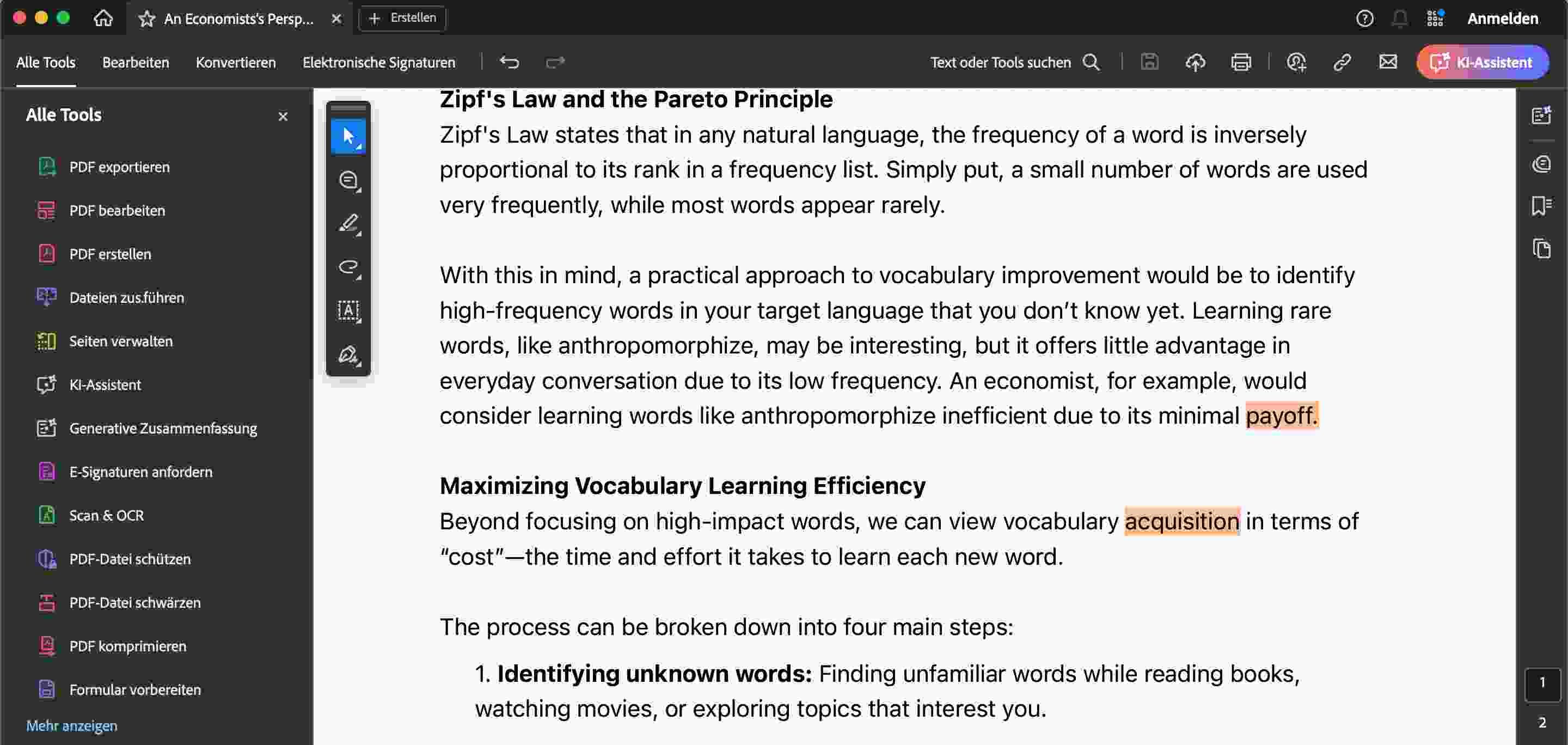
✅ Detect Only Highlighted Words
This is one of the most efficient features for focused studying. Go through your PDF in any standard editor and highlight the words or phrases you don't know. When you upload the file and select this option, our tool will only create flashcards for the terms you've marked. No more sifting through vocabulary you already know!
✅ Filter Words by Frequency
Want to target less common or more advanced vocabulary? Use this filter. By setting a frequency range, you can instruct the generator to ignore common words (like "the," "and," "is") and focus only on the specialized terminology that will truly expand your skills.
Step 4: Generate and Study!
Once you've set your preferences, click "Generate." In seconds, you'll have a clean, ready-to-use list of vocabulary flashcards, complete with translations and context. You can then export this list for use in spaced repetition apps like Anki or study it directly.
- For Students: Before your next lecture, download the presentation slides. During the class, highlight any key terms you're unfamiliar with. Immediately after, upload the PDF to VocabGenerator to create a study deck that's ready for your exam preparation.
- For Language Learners: Find an online newspaper or a short story in your target language and save it as a PDF. Read through it, highlight every new word you encounter, and instantly create a personalized vocabulary deck based on content you find interesting.
- For Professionals: Need to get up to speed on new industry jargon? Convert technical manuals, white papers, or training documents into flashcards to quickly and efficiently master the terminology of your field.
Passive rereading is one of the least effective ways to learn. It’s time to make your study sessions more active, efficient, and engaging. By turning your static PDFs into powerful, interactive flashcards, you can spend less time making notes and more time actually learning.
Dive deeper into your studies with a smarter tool. Explore our PDF-to-Flashcards converter now and see how it changes your learning dynamics:
Ready to start your Flashcards Journey with VocabGenerator?
Create your language learning flashcards: