Effortlessly create translated vocabulary flashcards for every highlighted word in an image. The highlighted unknown words which you want to learn will be detected and turned into translated flashcards. Feel free to read the Blog Article about this feature or try it out yourself:
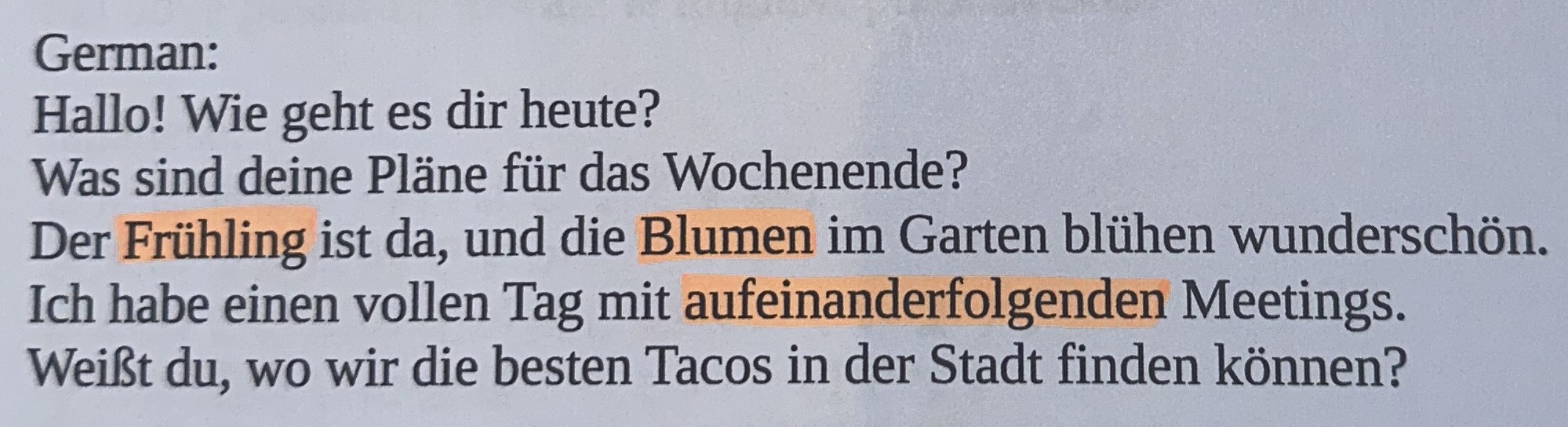
Stop manually typing out words from your physical books. Our Photo to Flashcards feature uses advanced OCR (Optical Character Recognition) to identify words you've highlighted on a page. This is the ultimate tool for readers who want to digitize their physical book vocabulary for Anki or Quizlet.
Simply take a picture of your book page where you have used a highlighter. Our Image to Flashcard generator scans the image to detect marked text, extracts the characters, and fetches the translation for you.

Here's how it works:
| Language | Image Text Recognition |
Translation | Word Frequency Info |
Context Detection (disabled) |
|---|---|---|---|---|
| Afrikaans | ✓ | ✓ | ✗ | ✗ |
| Albanian | ✓ | ✓ | ✗ | ✗ |
| Arabic | (✓) | ✓ | ✓ | ✗ |
| Assamese | (✓) | ✓ | ✗ | ✗ |
| Azerbaijani | ✓ | ✓ | ✗ | ✗ |
| Belarusian | (✓) | ✓ | ✗ | ✗ |
| Bengali | (✓) | ✓ | ✗ | ✗ |
| Bosnian | ✓ | ✓ | ✓ | ✗ |
| Bulgarian | (✓) | ✓ | ✓ | ✗ |
| Croatian | ✓ | ✓ | ✓ | ✗ |
| Czech | ✓ | ✓ | ✓ | ✗ |
| Danish | ✓ | ✓ | ✓ | ✗ |
| Dutch | ✓ | ✓ | ✓ | ✗ |
| English | ✓ | ✓ | ✓ | ✗ |
| Estonian | ✓ | ✓ | ✗ | ✗ |
| Finnish | (✓) | ✓ | ✓ | ✗ |
| French | ✓ | ✓ | ✓ | ✗ |
| German | ✓ | ✓ | ✓ | ✗ |
| Greek | (✓) | ✓ | ✓ | ✗ |
| Hindi | (✓) | ✓ | ✓ | ✗ |
| Hungarian | ✓ | ✓ | ✓ | ✗ |
| Icelandic | ✓ | ✓ | ✓ | ✗ |
| Indonesian | ✓ | ✓ | ✓ | ✗ |
| Irish | ✓ | ✓ | ✗ | ✗ |
| Italian | ✓ | ✓ | ✓ | ✗ |
| Korean | (✓) | ✓ | ✓ | ✗ |
| Latin | ✓ | ✓ | ✗ | ✗ |
| Latvian | ✓ | ✓ | ✓ | ✗ |
| Lithuanian | ✓ | ✓ | ✓ | ✗ |
| Malay | ✓ | ✓ | ✓ | ✗ |
| Maltese | ✓ | ✓ | ✗ | ✗ |
| Maori | ✓ | ✓ | ✗ | ✗ |
| Marathi | (✓) | ✓ | ✗ | ✗ |
| Mongolian | (✓) | ✓ | ✗ | ✗ |
| Nepali | (✓) | ✓ | ✗ | ✗ |
| Norwegian | ✓ | ✓ | ✓ | ✗ |
| Occitan | ✓ | ✓ | ✗ | ✗ |
| Persian | (✓) | ✓ | ✓ | ✗ |
| Polish | ✓ | ✓ | ✓ | ✗ |
| Portuguese | ✓ | ✓ | ✓ | ✗ |
| Romanian | ✓ | ✓ | ✓ | ✗ |
| Russian | (✓) | ✓ | ✓ | ✗ |
| Serbian (cyrillic) | (✓) | ✓ | ✓ | ✗ |
| Serbian (latin) | (✓) | ✓ | ✓ | ✗ |
| Slovak | ✓ | ✓ | ✓ | ✗ |
| Slovenian | ✓ | ✓ | ✓ | ✗ |
| Spanish | ✓ | ✓ | ✓ | ✗ |
| Swahili | ✓ | ✓ | ✗ | ✗ |
| Swedish | ✓ | ✓ | ✓ | ✗ |
| Tajik | (✓) | ✓ | ✗ | ✗ |
| Tamil | (✓) | ✓ | ✓ | ✗ |
| Turkish | ✓ | ✓ | ✓ | ✗ |
| Ukrainian | (✓) | ✓ | ✓ | ✗ |
| Urdu | (✓) | ✓ | ✓ | ✗ |
| Uyghur | (✓) | ✓ | ✗ | ✗ |
| Uzbek | ✓ | ✓ | ✗ | ✗ |
| Vietnamese | ✓ | ✓ | ✓ | ✗ |
| Welsh | ✓ | ✓ | ✗ | ✗ |
